iqInterface User Manual
  • Introduction
    • Get Started
  • Physical connection
    • Connection overview
    • PC connection
    • IO-Link connection
    • Pin connection diagram
  • iqTool GUI
    • Installation guide
    • PC connection configuration
    • IO-Link master mode
      • Master Configuration
      • Change IO-Link operation mode
      • Active IO-Link communication
        • Current IO-Link state
        • Incoming events from device
        • Read/Write ISDU requests
        • Monitor/Set Process Data Input/Output
        • Data view
      • Macro sequences
    • IO-Link generic device mode
      • Device Configuration
        • IO-Link device communication parameters
        • ISDU Parameters
        • Backup configuration
      • Active IO-Link communication
        • Monitor IO-Link State
        • Monitor/Set Process data Output/Input
        • Send IO-Link Event
    • Update and upgrade iqInterface firmware
      • Update
      • Upgrade
      • Device info
    • iqTool changelog
      • Version 1.1.0.1 (04.03.2013)
      • Version 1.1.0.2 (04.07.2013)
      • Version 1.1.0.3 (23.10.2013)
      • Version 1.1.0.4 (25.08.2014)
      • V1.1.0.5 (15.04.2015)
  • C driver DLL
    • Get started
    • API description
      • Common
        • Data types
        • EventQualifierT (IO-Link event qualifier)
        • Error return values
      • Master mode
        • mst_Connect (connect to iqInterface over comport/USB in master mode)
        • mst_EthernetConnect (connect to iqInterface over Ethernet (tcp/ip) in master mode)
        • mst_Disconnect (disconnect iqInterface in master mode)
        • mst_GetConfig and mst_SetConfig (get/set master mode configuration)
        • mst_ConfigT (master mode configuration data type)
        • mst_SetOperatingMode (change IO-Link operating mode)
        • mst_GetStatus (get status of iqInterface and PD input in master mode)
        • mst_SetPDValue: (set process data output)
        • mst_SetPDValidity (set process data output validity)
        • mst_WaitODRsp (Wait for ISDU response)
        • mst_StartReadOD (Start asynchronous ISDU read request)
        • mst_GetReadODRsp (Get ISDU read response)
        • mst_ReadOD (ISDU read request)
        • mst_StartWriteOD (Start asynchronous ISDU Write request)
        • mst_GetWriteODRsp (Get ISDU Write response)
        • mst_WriteOD (ISDU write request)
        • mst_ReadEvent (receive an IO-Link event from device)
      • Device mode
        • dev_Connect (connect to iqInterface over comport/USB in generic device mode)
        • dev_EthernetConnect (connect to iqInterface over Ethernet (tcp/ip) in generic device mode)
        • dev_Disconnect (disconnect iqInterface in generic device mode)
        • dev_GetConfig and dev_SetConfig (get/set generic device mode configuration)
        • dev_ConfigT (generic device mode configuration data type)
        • dev_GetODRequest (wait and read ISDU request from master)
        • dev_ODResponse (send ISDU response to master)
        • dev_AddISDU (add new ISDU parameter to generic device)
        • dev_RemoveAllISDU (remove all ISDU parameters from generic device)
        • dev_GetISDUValue (get ISDU parameter value)
        • dev_SetISDUValue (set ISDU parameter value)
        • dev_GetStatus (get generic device status)
        • dev_SetPDIn (set process data input and its validity)
        • dev_SendEvent (send IO-Link event to master)
      • Ethernet connection (tcp/ip)
        • Startup Ethernet connection
        • comm_EthernetSearch (search iqInterface IP in LAN)
        • enet_ConnectionT (Ethernet connection type)
    • C driver DLL changelog
      • Version 1.1.0.1 (15.01.2014)
      • Version 1.1.0.2 (25.08.2014)
      • Version 1.1.0.3 (06.07.2015)
  • Firmware changelog
    • Version 1.1.0.1 (04.03.2013)
    • Version 1.1.0.2 (04.07.2013)
    • Version 1.1.0.3 (12.10.2013)
    • Version 1.1.0.4 (25.11.2013)
    • Version 1.1.0.5 (03.12.2013)
    • Version 1.1.0.6 (25.08.2014)
    • V1.1.0.7 (15.04.2015)
    • Version 1.1.0.8 (12.05.2015)
    • Version 1.1.0.9 (06.07.2015)
  • Troubleshooting
    • No connection with iqInterface or USB driver installion fails
 
iqInterface User Manual
  • Docs »
  • iqTool GUI »
  • IO-Link master mode »
  • Active IO-Link communication
  • Edit on Bitbucket

Active IO-Link communication

Current IO-Link state

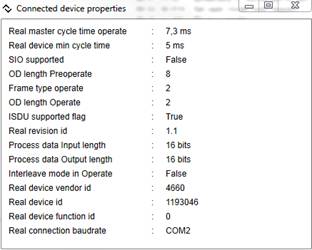
If you have established an active IO-Link communication (state “preoperate” or “operate”) you can see its current state and properties of connected device pressing “Device properties” button in the “IO-Link” group box.
../../_images/connected_device.jpg

Incoming events from device

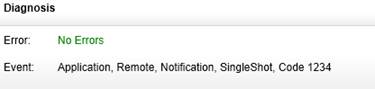
You can also see last event sent by the connected device in the “Diagnosis” group box (former arrived events still stay in log text box).
../../_images/mst_event.jpg

Read/Write ISDU requests

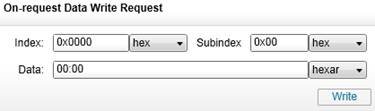
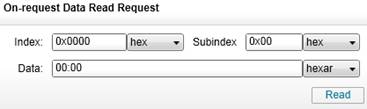
To read/write ISDU (Indexed Service Data Unit) parameters or commands input corresponding index and subindex of ISDU and data in case of write operation. Then press “read” or “write” buttons. The controls are located in “On-request data” group boxes.

Read reuest:
../../_images/mst_isdu_read.jpg

Write reuest:

../../_images/mst_isdu_write.jpg

Monitor/Set Process Data Input/Output

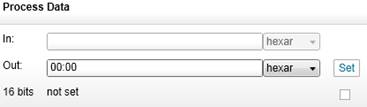
In operate state you can see current process data input which device sends to master and set current process data output which master will send to device. You can also set process data output validity using check box under the “Set” button (checked – valid, not checked - invalid).
../../_images/mst_pd.jpg

Data view

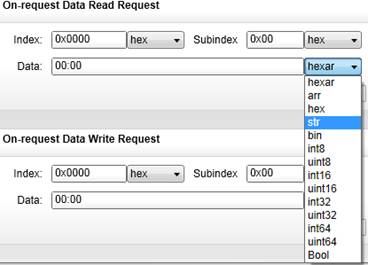
Process data, ISDU index, subindex and its data can be seen in different representations.

  • “hexar” is semicolon separated 2-symbol hex byte array like “12:A4:CD” (default)
  • ASCII string
  • Boolean (one byte: 0 – false; not 0 – true, packed as 0xFF) type
  • signed/unsigned integers with various lengths 8-64 bits.

Boolean or integer types can be viewed only if data length corresponds to them. To send their values iqTool pack them into corresponding bytes number according to IO-Link specification (MSB is sent first).
../../_images/data_types.jpg
Next Previous

© Copyright 2014, IQ² Development GmbH.

Built with Sphinx using a theme provided by Read the Docs.