iqInterface User Manual
latest
  • Introduction
  • Physical connection
  • iqTool GUI
    • Installation guide
    • PC connection configuration
    • IO-Link master mode
    • IO-Link generic device mode
      • Device Configuration
      • Active IO-Link communication
        • Monitor IO-Link State
        • Monitor/Set Process data Output/Input
        • Send IO-Link Event
    • Update and upgrade iqInterface firmware
    • iqTool changelog
  • C driver DLL
  • Firmware changelog
  • Troubleshooting
iqInterface User Manual
  • Docs »
  • iqTool GUI »
  • IO-Link generic device mode »
  • Active IO-Link communication
  • Edit on Bitbucket

Active IO-Link communication

If IO-Link communication is activated from the master side (Preoperate or Operate) you can make the following actions:
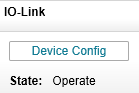
Monitor IO-Link State

You can see IO-Link communication state in the “IO-Link” group box.

../../_images/dev_state.png

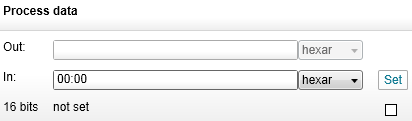
Monitor/Set Process data Output/Input

You can see a current process data output which the master transfers to the generic device and set a current process data input which the generic device will transfer to the master. To set process data input valid/invalid, set/unset a check box under the “Set” button.
../../_images/dev_pd.png

Send IO-Link Event

You can send an IO-Link event from the generic device to the master. To do it select type and mode of the event, input its code and press “Send Event” button.

../../_images/dev_event.png
Next Previous

© Copyright 2014, IQ² Development GmbH. Revision 5756e99e5571+.

Built with Sphinx using a theme provided by Read the Docs.