iqInterface User Manual
latest
  • Introduction
  • Physical connection
  • iqTool GUI
    • Installation guide
    • PC connection configuration
    • IO-Link master mode
      • Master Configuration
      • Change IO-Link operation mode
      • Active IO-Link communication
      • Macro sequences
    • IO-Link generic device mode
    • Update and upgrade iqInterface firmware
    • iqTool changelog
  • C driver DLL
  • Firmware changelog
  • Troubleshooting
iqInterface User Manual
  • Docs »
  • iqTool GUI »
  • IO-Link master mode
  • Edit on Bitbucket

IO-Link master mode

In master mode iqInterface can be connected to other IO-Link device to perform standard IO-Link master actions. You can configure master system manager parameters (cycle time, device check level etc.) and setup data storage. After configuring the master you can change IO-Link operation mode (inactive, preoperate, operate, auto), receive IO-Link events, set/get process data and read/write ISDU parameters. You can also record macro actions sequences to replay them automatically at once. To switch into master mode:

  • disconnect iqTool from iqInterface if connected (see PC connection)
  • select “iqMaster” tab and connect iqTool to iqInterface again
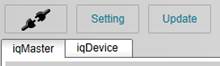
../_images/mst_connect.jpg
  • Master Configuration
  • Change IO-Link operation mode
  • Active IO-Link communication
    • Current IO-Link state
    • Incoming events from device
    • Read/Write ISDU requests
    • Monitor/Set Process Data Input/Output
    • Data view
  • Macro sequences
Next Previous

© Copyright 2014, IQ² Development GmbH. Revision 5756e99e5571+.

Built with Sphinx using a theme provided by Read the Docs.