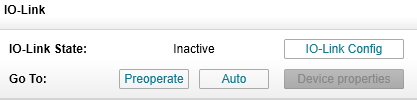
Change IO-Link operation mode
Every time you connected iqTool to iqInterface in master mode you can see status of current IO-Link communication. It is located after label “IO-Link state” in “IO-Link” group box (Inactive, Preoperate, Operate or Check fault). There are also possible transfers from this state after “Go to” label (Inactive, Preoperate, Operate or Auto). “Check fault” state means that you have configured master to check some parameters during startup (see Master Configuration) and they failed. “Check fault” state is equivalent to preoperate but you cannot go to operate from it. “Auto” mode means that iqInterface will try constantly to switch to operate with any connected device even after a communication lost with last one. In contrast “Operate” mode means that iqInterface will make only one trial to establish communication with a device according to IO-Link specification.