iqInterface User Manual
latest
  • Introduction
  • Physical connection
  • iqTool GUI
    • Installation guide
    • PC connection configuration
    • IO-Link master mode
    • IO-Link generic device mode
      • Device Configuration
        • IO-Link device communication parameters
        • ISDU Parameters
        • Backup configuration
      • Active IO-Link communication
    • Update and upgrade iqInterface firmware
    • iqTool changelog
  • C driver DLL
  • Firmware changelog
  • Troubleshooting
iqInterface User Manual
  • Docs »
  • iqTool GUI »
  • IO-Link generic device mode »
  • Device Configuration »
  • IO-Link device communication parameters
  • Edit on Bitbucket

IO-Link device communication parameters

To configure IO-Link device communication parameters press the “Device Config” button at the top leftmost corner of the “IO-Link” group box:
../../_images/dev_config_button.png

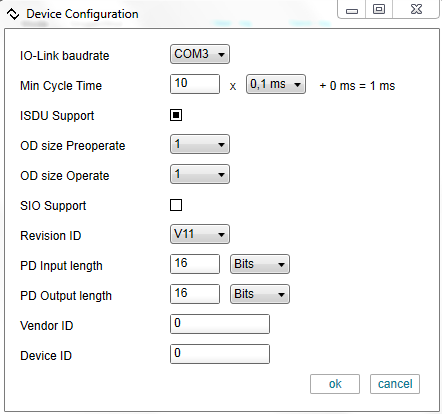
Configuration dialog:

../../_images/dev_config.png

Min cycle time should be sufficient to send/receive all master/device message bytes with the selected baudrate:

Tcycle time = (Tmaster message + OD + Tdevice message) * 14 * Tbit + Tidle

where:

Tmaster message = 2 + Process data output byte count

OD = On-request data byte count (from master or device, depending on r/w direction)

Tdevice message = Process data input byte count + 1 + 1

Tbit = 0.00434ms (for COM3), 0.02604ms (COM2), 0.20833ms (COM1)

Tidle = some pause for an idle time can be roughly the same as the previous part.

Next Previous

© Copyright 2014, IQ² Development GmbH. Revision 5756e99e5571+.

Built with Sphinx using a theme provided by Read the Docs.